Support
Support
How to install dBCut, activate your license and fix the most common problems.
Write with your order number, your Premiere Pro version and a screenshot of the message.
Requirements
- Windows 10 or 11 (64-bit). dBCut is not available for macOS.
- Adobe Premiere Pro 2026 or newer.
- An internet connection to activate your license (afterwards dBCut also works offline).
Install
- Extract the ZIP first: right-click it › Extract All. (The installer can't run from inside the ZIP.)
- Close Premiere Pro.
- In the extracted folder, double-click Install dBCut.
- Open Premiere Pro and choose Window › Extensions › dBCut.
If Windows shows “Windows protected your PC”, click More info › Run anyway. The installer only copies dBCut into your own Premiere Pro extensions folder. It doesn't need administrator rights and doesn't change any system setting.
Activate your license
- In dBCut, open the menu (the ⋯ button at the top right) › License…
- Paste the license key from your purchase email and click Activate.
- One license can be used on up to 2 computers.
- To move it to another computer, first open ⋯ › License… › Deactivate on this computer (or answer Yes when the uninstaller asks).
- Without a license dBCut runs in preview mode: you can analyze and listen, but not apply the cuts.
- dBCut checks the license online about once a week. Offline it keeps working for up to 30 days since the last check.
Lost your key? It's in your purchase email, and on your Lemon Squeezy My Orders page.
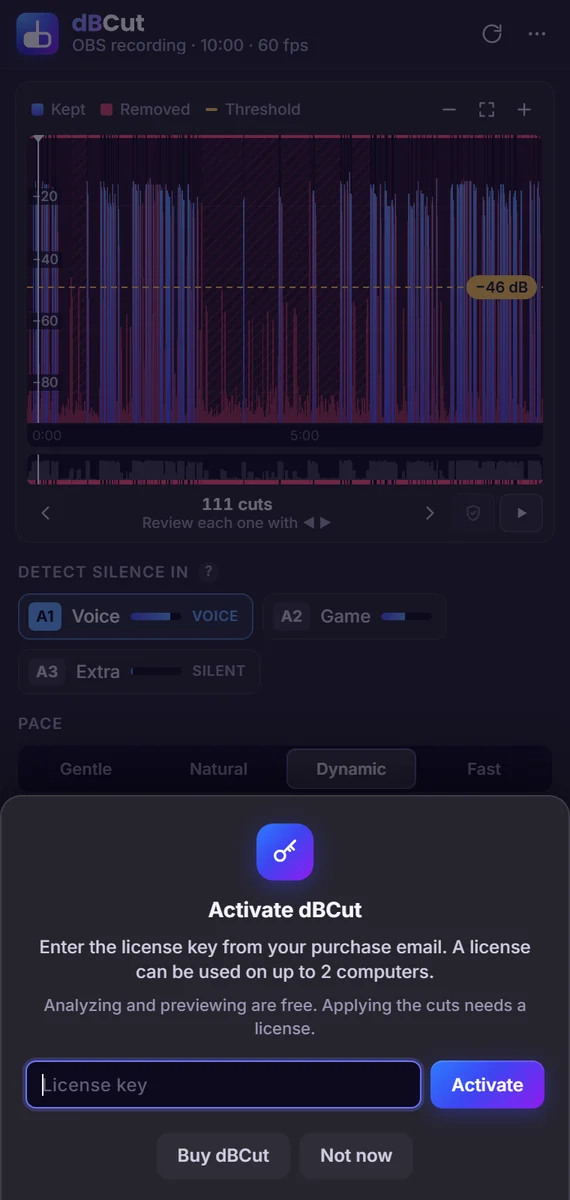
Quick start
- Open the sequence you want to clean up and click Analyze the sequence.
- Choose the tracks to listen to (usually your voice) and a pace (Gentle, Natural, Dynamic, Fast). The threshold is set automatically.
- Review: use the arrow keys to jump between cuts, C to keep a pause, Space to listen.
- Click Cut N silences. By default dBCut works on a copy of your sequence. Undo in the bar at the bottom restores everything.
Language
dBCut follows Premiere Pro's language (English, Spanish, Portuguese (Brazil), German). To choose another one: ⋯ › Language…
Update
Download the new version (link in your purchase email or on My Orders) and run Install dBCut again. Your license and settings are kept.
Uninstall
Close Premiere Pro and double-click Uninstall dBCut. It asks whether to free this computer's license activation and whether to delete dBCut's analysis cache.
Troubleshooting
- dBCut isn't in Window › Extensions: close Premiere Pro, run Install dBCut again and restart Premiere Pro.
- “Can't reach the license server”: check your internet connection, firewall or proxy. dBCut connects to
api.lemonsqueezy.comonly to activate and check the license. - “This key is already in use on 2 computers”: deactivate it on one of them (⋯ › License…) or write to support.
- Anything else: write to alexxl5bussines@gmail.com with your order number, your Premiere Pro version and a screenshot of the message.